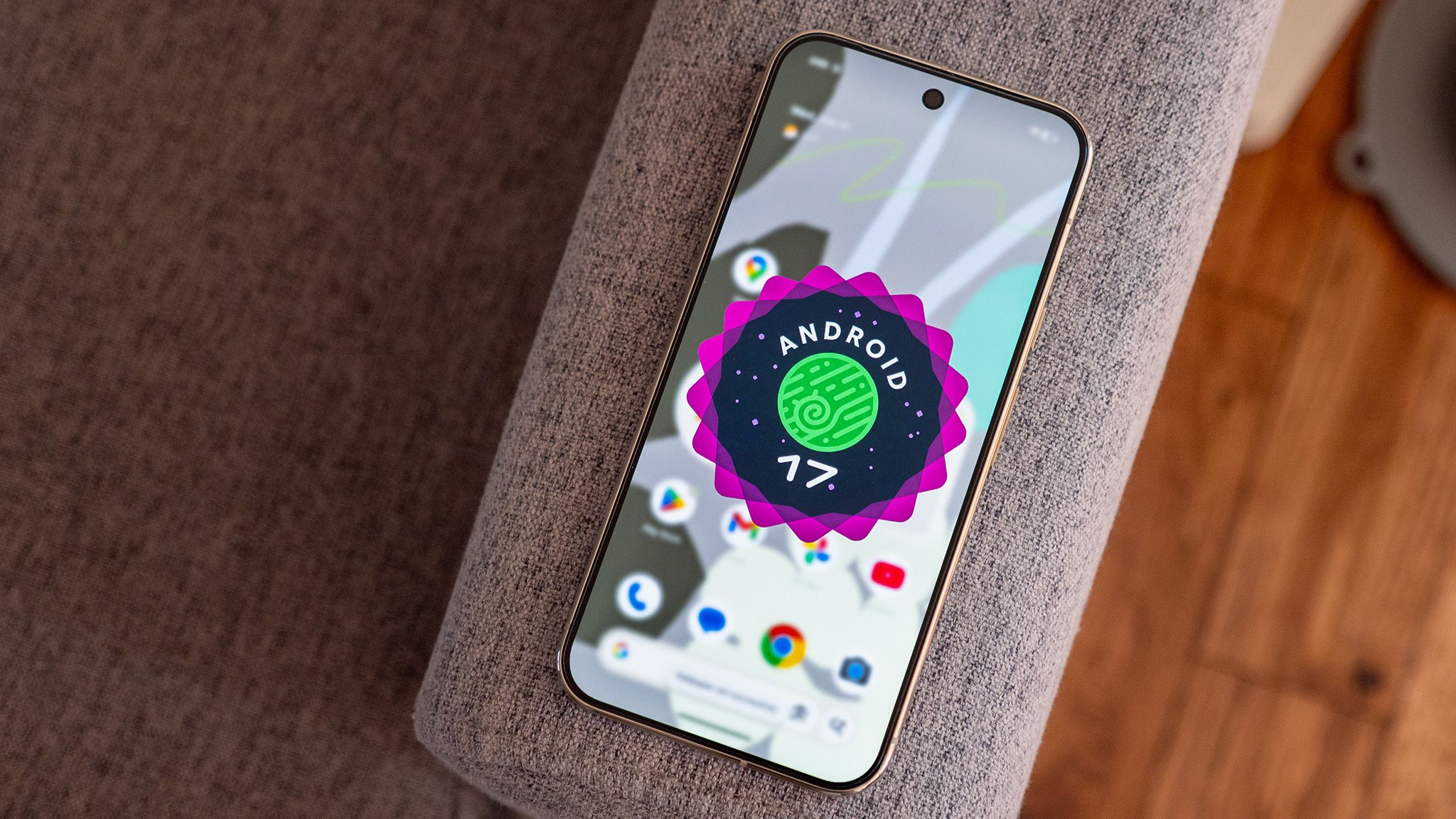
Android has always been synonymous with innovation, but Google’s latest release takes things to an entirely new level. Android 17, which reached Platform Stability with Beta 3 and is expected to launch its stable version in June 2026, represents a fundamental shift in how we interact with our smartphones. This isn’t just another incremental update with minor tweaks and feature additions. Instead, Google has reimagined Android as what they call an “intelligence system” rather than just an operating system, powered by their cutting-edge Gemini AI technology.
From revolutionary AI-powered automation that can handle complex multi-step tasks across multiple apps to robust security features that protect against sophisticated scam calls and device theft, Android 17 is packed with innovations that will transform your mobile experience. Whether you’re a content creator looking for professional-grade editing tools, a security-conscious user wanting better protection, or simply someone who wants their phone to work smarter and more intuitively, this update has something significant to offer.
Let’s dive deep into all the groundbreaking features that make Android 17 one of the most exciting Android releases in years.
Gemini Intelligence: The Brain Behind Android 17

At the absolute core of Android 17 lies Gemini Intelligence, Google’s sophisticated AI system that fundamentally changes how your device understands and responds to your needs. This isn’t just a rebranded chatbot or a simple voice assistant upgrade. Gemini Intelligence represents a complete paradigm shift, transforming your smartphone from a reactive tool that waits for commands into a proactive assistant that anticipates your needs and takes meaningful action across your entire digital ecosystem.
Multi-Step App Automation

One of the most impressive capabilities of Gemini Intelligence is its ability to handle complex, multi-step tasks that span across multiple applications. Imagine you’re planning a weekend getaway. Instead of manually opening your calendar app, checking your schedule, switching to a travel booking app, searching for hotels, opening your banking app to check your budget, and then finally making a reservation, you can simply tell Gemini what you want to accomplish.
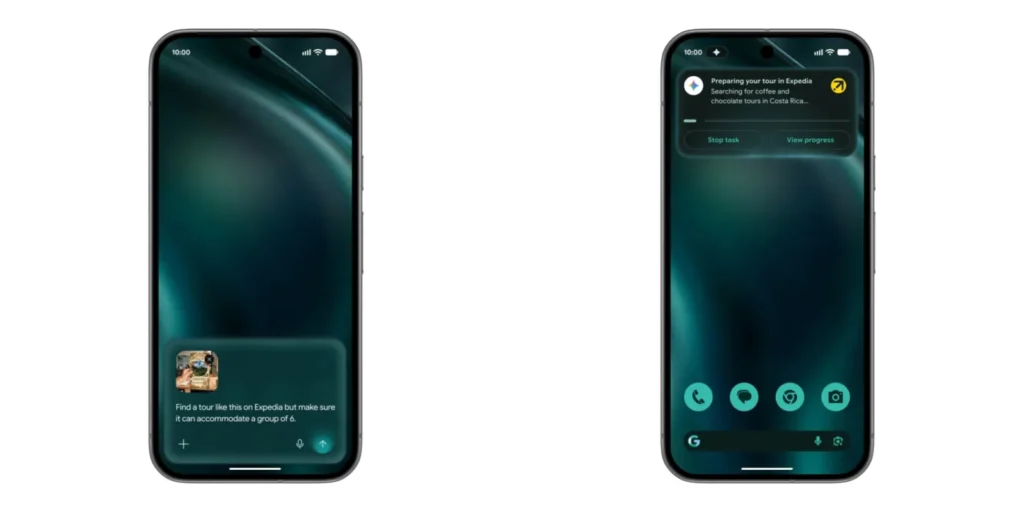
For example, you could point your phone’s camera at a hotel brochure and ask Gemini to find similar tour packages for six people on Expedia. Gemini will read the brochure using optical character recognition, understand the type of experience you’re looking for, open Expedia automatically, search for comparable options, and present you with results. The system maintains control by pausing for your approval before making any purchases, posting content, or sending messages.
This automation extends to everyday tasks like booking fitness classes, managing email responses, coordinating shopping across multiple retailers, and planning complex travel itineraries. Google has designed this feature to keep you in control while eliminating the tedious app-switching and data entry that consumes so much of our screen time.
Rambler: Voice Dictation Reimagined
Have you ever recorded a voice message or dictated a text only to cringe at all the “ums,” “ahs,” and “likes” peppered throughout? Rambler, powered by Gemini Intelligence in Gboard, solves this problem elegantly. This AI-powered voice dictation feature processes your speech in real time, removing filler words and transforming casual, rambling speech into clean, structured, and polished text.
What makes Rambler particularly impressive is its multilingual capability. You can switch between languages mid-sentence, and Rambler will understand the context and produce coherent output. This feature is ideal for professionals who need to send quick but professional messages, students taking voice notes during lectures, or anyone who wants to communicate more effectively without spending time editing their dictation.
Importantly, Google has emphasized that all speech processing happens in real time and isn’t stored anywhere, addressing privacy concerns that often arise with voice-based AI features.
Create My Widget: Custom Widgets On Demand
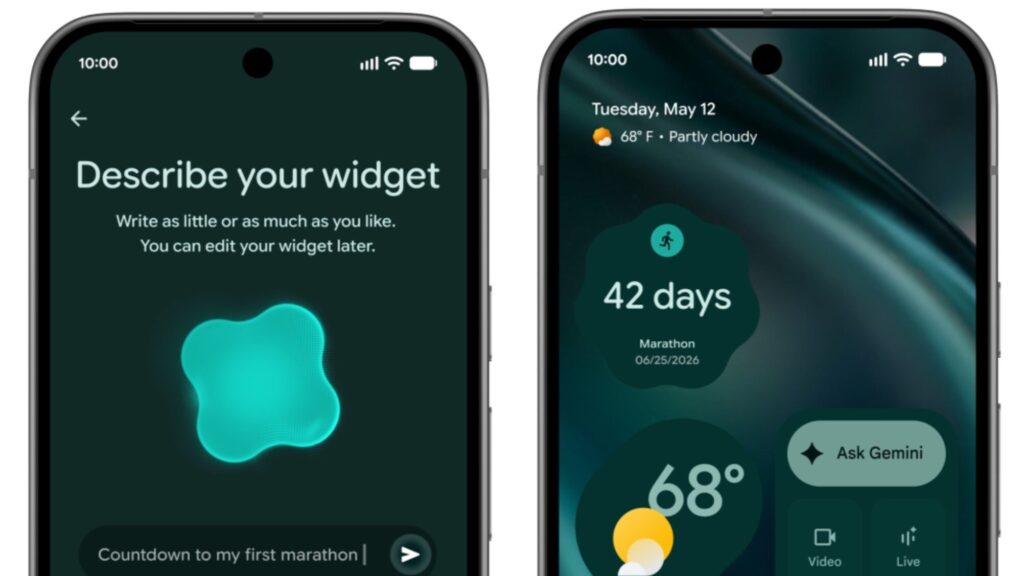
One of the most delightful features of Android 17 is Create My Widget, which uses Generative UI technology to let you create custom home screen widgets simply by describing what you want in natural language. Have you ever wanted a widget that shows exactly the information you need but couldn’t find one in the Play Store? Those days are over.
You can request widgets for virtually anything: a countdown to your wedding day, a fitness tracker that shows your specific metrics, meal planning tools with your dietary restrictions built in, stock information for your portfolio, weather data formatted exactly how you like it, or even custom calculators for your specific needs.
The widgets are generated on-demand and personalized to your exact specifications. This feature works across Android phones, Wear OS smartwatches, and even Android Auto, ensuring a consistent and customized experience across all your devices.
Intelligent Autofill: Context-Aware Form Filling
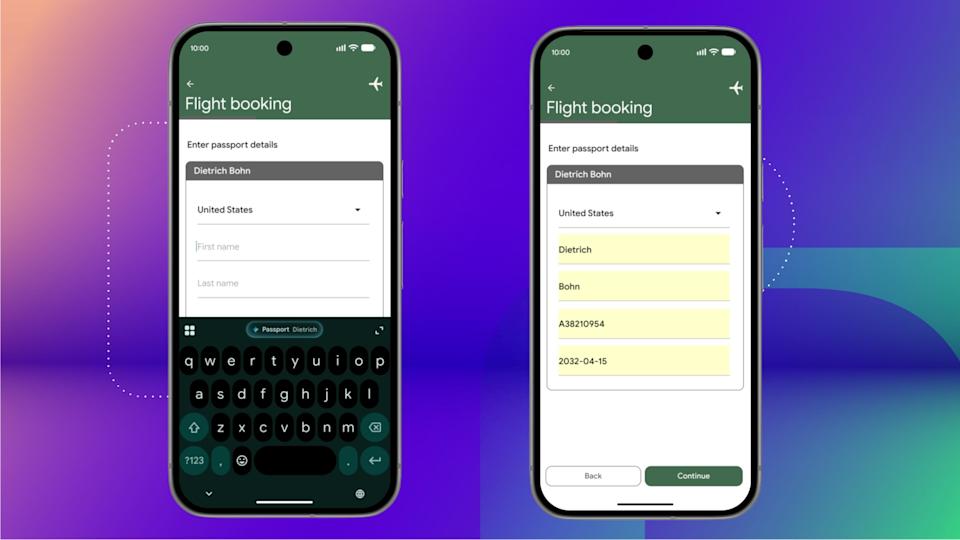
Google has significantly upgraded the autofill system in Android 17 with Gemini Intelligence. While the old autofill could remember your name, address, and credit card number, the new Intelligent Autofill can pull information from across your Google ecosystem.
For instance, if you’re filling out a visa application that requires your passport number, Intelligent Autofill can access a photo of your passport from Google Photos, extract the relevant details using optical character recognition, and fill in the passport number field automatically. This works across Gmail, Google Wallet, Google Photos, and other connected apps, making form-filling dramatically faster and more accurate.
This feature is opt-in, with clear privacy controls that let you decide which apps and data sources can be accessed. You maintain complete control through settings toggles.
Visual Context Understanding
Gemini Intelligence can now draw context from what’s displayed on your screen, enabling powerful new workflows. If you have a shopping list displayed in your Notes app, you can long-press the power button while viewing the list, and Gemini will automatically build a shopping cart with all those items on your preferred delivery service.
This visual context understanding works across various scenarios: comparing products while shopping online, extracting information from documents, understanding complex diagrams, and even helping with homework by analyzing problems shown on screen.
Revolutionary Creator Tools
Android 17 introduces a comprehensive suite of features specifically designed for content creators, making your smartphone a legitimate mobile production studio.
Screen Reactions
Screen Reactions is a game-changing feature that lets you record reaction videos directly over clips without switching apps or setting up a green screen. In just a few taps, you can record yourself and your screen simultaneously, overlaying your authentic response onto trending videos, comment sections, or product demonstrations.
This feature will roll out first on Pixel devices during summer 2026, giving creators an incredibly powerful tool for engaging content creation. Whether you’re making reaction videos for YouTube, creating response content for TikTok, or producing educational tutorials, Screen Reactions eliminates the technical complexity that previously required third-party apps and complicated editing.
Instagram Integration and Enhancements
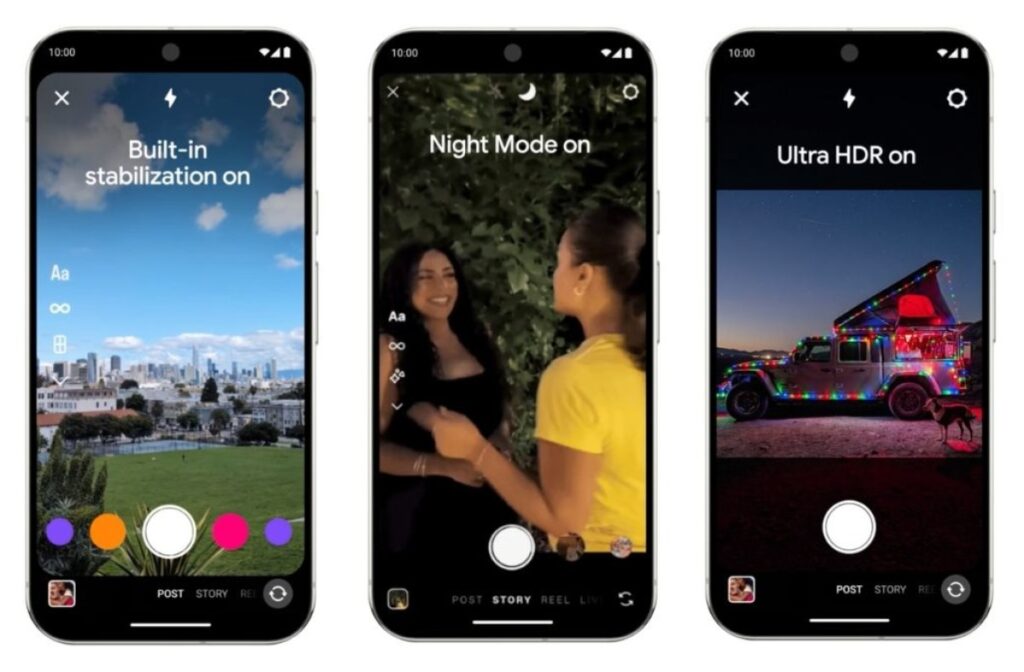
Google has partnered with Meta to bring the best of Instagram to Android’s most advanced devices. These exclusive features include Ultra HDR capture and playback for photos with vibrant colors that truly pop, built-in video stabilization for smooth footage even when you’re moving, and enhanced night mode photography.
Android 17 also brings new tools to Instagram’s Edits app exclusively on Android, powered by on-device AI. The Smart Enhance feature instantly upscales photos and videos with a single tap using advanced AI. Sound Separation can identify and separate audio tracks including wind, background noise, and music, allowing you to boost the sounds you want while removing what you don’t need.
For creators who prefer working on larger screens, Instagram is now fully optimized for Android tablets, making the most of the expansive display real estate for editing and content management.
Adobe Premiere for Android

Professional video editing is coming to Android with the Adobe Premiere app arriving soon. This represents a significant milestone, bringing desktop-class creative software to mobile devices and allowing YouTubers, filmmakers, and vloggers to treat their Android phones and tablets as true mobile workstations.
Comprehensive Security and Privacy Upgrades
Security and privacy form a cornerstone of Android 17, with Google implementing multiple layers of protection against evolving threats.
Verified Financial Calls: Fighting Banking Scams
One of the most innovative security features addresses a growing problem: scam calls from criminals spoofing caller IDs to impersonate banks and financial institutions. These scams result in an estimated $950 million in annual losses worldwide.
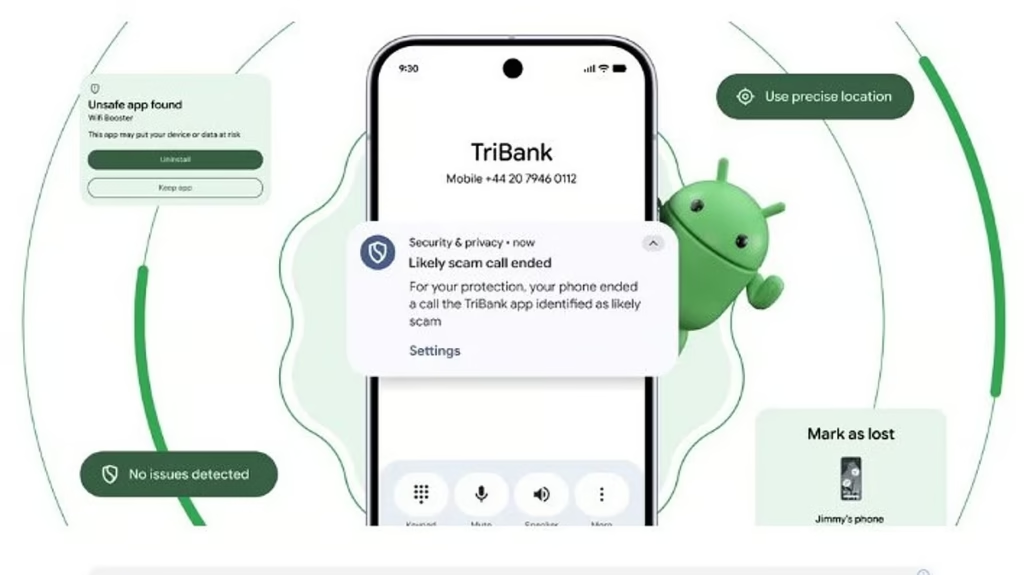
Android 17’s Verified Financial Calls feature works intelligently in the background. When a participating bank or financial institution’s app is installed on your phone and you’re signed in, Android can verify incoming calls. If a call appears to come from your bank, the system asks the bank’s app to confirm whether they’re actually calling you. If the app indicates no call is being made, Android automatically terminates the call before you even answer.
This feature will initially launch with Revolut, Itaú, and Nubank, with more banks joining throughout 2026. Banks can also designate certain numbers as inbound-only, helping the system identify and block fraudulent calls.
Enhanced Device Theft Protection
The Mark as Lost feature in Android 17’s Find Hub receives significant security improvements. When you mark your phone as lost, Android 17 can now lock the device using biometric authentication in addition to your regular PIN or password. This is crucial because if a thief has obtained or observed your passcode, biometric locking provides an additional barrier they cannot bypass.
When a device is marked as lost, Android 17 also hides Quick Settings and disables new Wi-Fi and Bluetooth connections, preventing thieves from disabling tracking features. Following successful pilots in Brazil, default-on theft protections are expanding globally. Features like Remote Lock and Theft Detection Lock will be enabled by default on all new Android 17 devices, as well as those freshly reset or upgraded.
In select markets including Argentina, Chile, Colombia, Mexico, and the United Kingdom, these protections extend to devices running Android 10 or newer, providing broad protection across the Android ecosystem.
Advanced Threat Detection
Live Threat Detection receives substantial upgrades in Android 17. The AI-powered system now monitors for additional suspicious behaviors including apps that secretly forward SMS messages, apps that use suspicious overlay techniques, apps hiding their icons before launching malicious background activities, and apps misusing accessibility permissions.
Android 17 introduces dynamic signal monitoring, which allows Google to push new threat-detection rules in real time to combat emerging malware techniques. This system will start rolling out in the second half of 2026 on select devices.
Chrome on Android also gains enhanced protection, scanning downloaded APK files for known malware before installation when Safe Browsing is enabled, preventing malicious apps from reaching your device in the first place.
OTP Protection
To combat SMS hijacking, Android 17 automatically hides one-time passwords sent via text message for three hours from most apps. This prevents malicious apps that have been granted SMS permissions from stealing your security codes to hijack your accounts. Developers are encouraged to transition to the SMS Retriever or SMS User Consent APIs for legitimate OTP access.
Privacy Controls and Permissions
Android 17 introduces granular privacy controls that give users unprecedented control over their data. A new temporary precise location button allows you to share your exact location only while a specific app is open. This is ideal for one-time tasks like finding a nearby restaurant, providing location access for that specific moment without granting permanent permissions.
A more visible location indicator appears whenever apps access your location, similar to existing camera and microphone indicators. You can tap this indicator to see which apps recently used location access and manage permissions immediately.
The new Contact Picker system lets you grant apps access to specific contacts instead of your entire address book. Apps can also request access only to certain contact fields (like phone numbers or email addresses), and this access is temporary and session-based. This prevents apps from tracking changes to your contacts over time and significantly reduces privacy exposure.
Network Security Enhancements
Android 17 introduces platform support for Encrypted Client Hello (ECH), a TLS 1.3 extension that encrypts the Server Name Indication during the initial handshake. This makes it more difficult for network intermediaries to identify which specific domains your apps are connecting to, protecting your browsing privacy.
Android 17 also gives carriers the ability to configure the disable 2G toggle to default to off, protecting users from legacy technology vulnerabilities in areas where 2G infrastructure is no longer properly maintained.
Post-Quantum Cryptography
Looking toward future threats, Android 17 introduces Post-Quantum Cryptography to protect against potential attacks from quantum computers. Apps using Play App Signing can wait for Google Play to provide an option to upgrade to hybrid signatures using PQC keys generated automatically. Apps using self-managed keys can utilize updated Android build tools to rotate to a hybrid identity combining PQC keys with classical keys.
Advanced Protection Mode Upgrades
Android’s Advanced Protection mode receives several key enhancements. The system now removes accessibility service access from all apps not explicitly labeled as accessibility tools, disables device-to-device unlocking and Chrome WebGPU support, and integrates scam detection for chat notifications. USB protection is now available on all Pixel devices running Android 16 or higher, with expansion to more Android devices coming soon.
Android Build Verification
To combat the distribution of unofficial, modified Android versions that appear legitimate while secretly compromising security, Android 17 introduces OS verification. Launching first on Pixel phones, this feature helps users confirm whether their device is running an official Android build, protecting against sophisticated supply chain attacks.
Enhanced User Experience and Customization
Beyond AI and security, Android 17 delivers numerous quality-of-life improvements that enhance daily interactions.
3D Emoji Redesign
After years of criticism that Android emojis looked too flat and uninspiring compared to iOS, Google is finally introducing redesigned 3D emojis using the Noto 3D collection. While the complete set hasn’t been fully revealed, preview images show significantly more depth, dimension, and expressiveness. This visual refresh will begin rolling out to Pixel devices later in 2026, with expansion to other Android devices following.
Bubbles for Any App
Previously reserved for messaging apps, the Bubbles feature now works with any app on your phone. This multitasking enhancement lets you stack your most-used apps in floating bubbles that remain accessible while you work in other applications. This is particularly useful on larger screens and foldable devices where screen real estate allows for sophisticated multitasking workflows.
Improved Split Screen
Android 17 introduces a redesigned interface for split-screen multitasking, making it more intuitive and easier to use. This is especially beneficial for foldables and tablets where users frequently work with multiple apps simultaneously.
Per-App Dark Theme
You can now set dark theme preferences on a per-app basis in Android 17. This granular control means you can have some apps in dark mode while keeping others in light mode, accommodating different use cases and preferences throughout the day.
Separate Voice Assistant Volume
Google has separated the voice assistant volume control, allowing you to adjust how loud the assistant speaks independently from other system sounds. This long-requested feature prevents situations where the assistant shouts responses in quiet environments or whispers unintelligibly in noisy ones.
Game Controller Button Mapping
For mobile gamers who use controllers, Android 17 includes built-in button remapping functionality. You can customize controller layouts to match your preferences without relying on third-party apps, improving the gaming experience significantly.
Android Auto Transformation
Android Auto receives a comprehensive overhaul focused on safety, usability, and entertainment.
Material 3 Expressive Design
The interface has been completely redesigned using Material 3 design principles, adapting seamlessly to various screen sizes and ensuring consistent functionality across different vehicles. The visual refresh makes the interface more modern and easier to navigate while driving.
3D Navigation
Android Auto now offers immersive 3D navigation with lane tracking and real-world visual alignment. This makes navigation safer and more intuitive by providing clear visual guidance that matches what drivers see through their windshield.
HD Video Playback
For parked vehicles, Android 17 brings support for 1080p video playback, transforming your car’s infotainment system into a legitimate entertainment hub during breaks or while waiting.
Gemini Integration
Gemini Intelligence provides contextual suggestions while driving, such as recommending nearby gas stations, restaurants, or points of interest. It can also share navigation addresses to other contacts and handle hands-free task management without distracting from the road.
Developer and Technical Enhancements
Android 17 introduces numerous improvements for developers and power users.
Photo Picker Customization
Developers can now modify the grid view aspect ratio of the photo picker using the PhotoPickerUiCustomizationParams API. You can switch from the default 1:1 square to a 9:16 portrait display, allowing better integration with app design aesthetics.
RAW14 Image Format
Professional camera apps can now capture 14-bit per pixel RAW images using the new ImageFormat.RAW14 constant. This allows maximum detail and color depth from compatible camera sensors, giving professional photographers and enthusiasts more editing flexibility.
NPU Management
Apps targeting Android 17 must declare the FEATURE_NEURAL_PROCESSING_UNIT hardware feature to directly access the Neural Processing Unit. This ensures apps properly utilize specialized AI hardware for optimal performance.
Large Screen App Compatibility
Apps targeting Android 17 running on large screens (600dp or wider) can no longer opt out of resizing or orientation changes. The system ignores screenOrientation, resizeableActivity, minAspectRatio, and maxAspectRatio attributes on large screens, with exemptions only for devices smaller than 600dp and apps categorized as games.
VoIP Call History Integration
Android 17 introduces user preference management for VoIP call history integration. Users can now choose whether to include VoIP calls from apps like WhatsApp in the system dialer’s call logs. The update also adds support for caller and participant avatar URIs, enriching the visual display of integrated call logs.
Time Zone Broadcast
A new intent, ACTION_TIMEZONE_OFFSET_CHANGED, triggers specifically on offset changes like daylight saving time transitions, giving developers more precise control over time-sensitive features.
ICU 78 and Unicode 17
Updated internationalization libraries support Unicode 17, ensuring proper display and handling of the latest emoji and international characters.
Digital Wellbeing Innovation
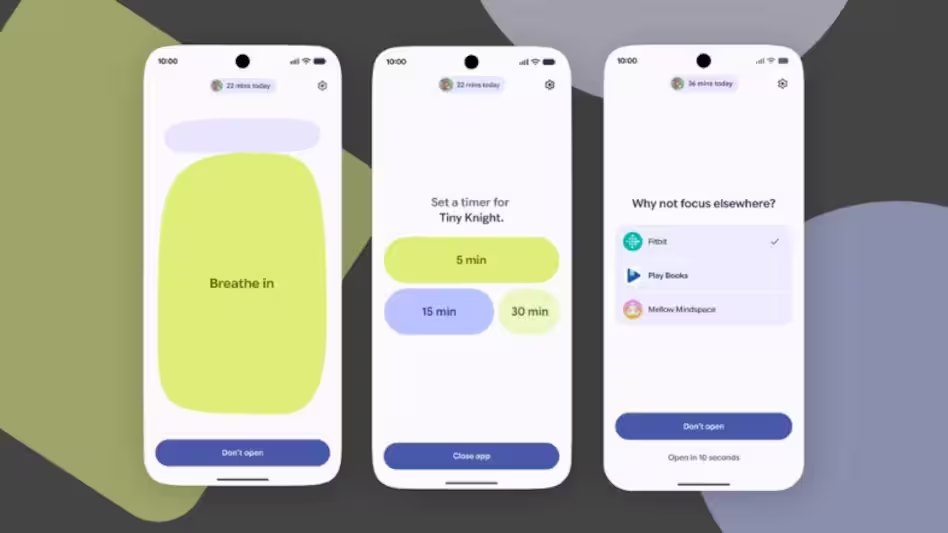
Android 17 introduces Pause Point, a thoughtful approach to reducing screen addiction. Unlike traditional app timers that are easy to dismiss or disable, Pause Point adds meaningful friction. When you reach a preset usage threshold, the feature creates a natural stopping point that encourages you to step away.
If you want to disable Pause Point entirely, Android requires a full phone restart, making it considerably more difficult to bypass in moments of weakness. Google designed this approach based on behavioral psychology research showing that small friction points are more effective than easily-dismissed warnings.
The system also includes mindful activity prompts that encourage you to take breaks and focus on physical wellbeing, helping create a healthier relationship with your device.
Cross-Platform Improvements
Enhanced iOS to Android Transfer
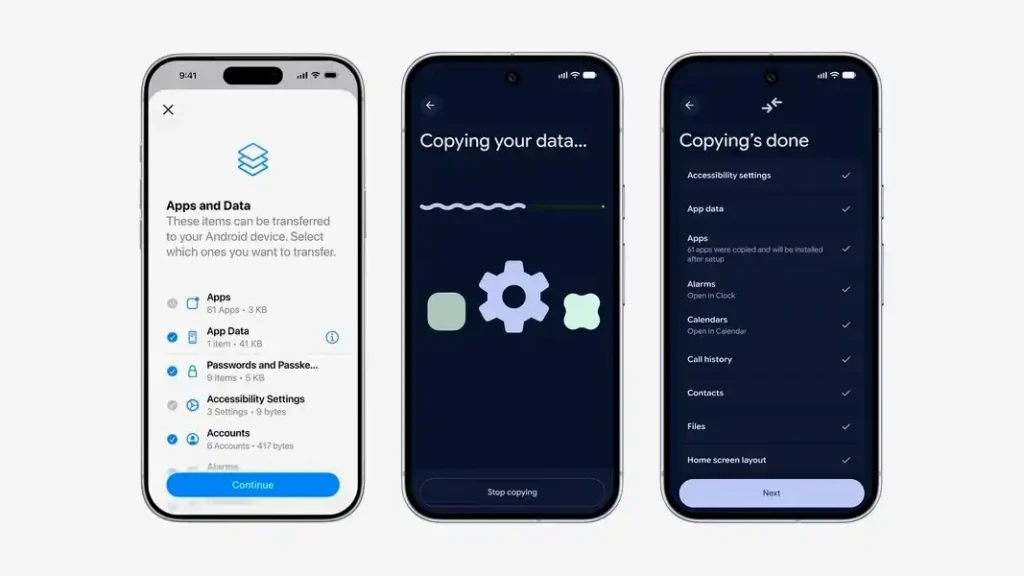
Google has worked directly with Apple to significantly improve the data transfer experience when switching from iPhone to Android. The updated process can now transfer apps and app data, eSIMs, home screen layouts, and even passwords wirelessly, making the switch far less painful than before.
This collaboration represents a significant shift in the mobile ecosystem, with both companies recognizing that making switching easier ultimately benefits consumers.
Chrome Integration
Gemini in Chrome for Android launches in late June 2026 with powerful capabilities. The browser can help you compare, research, and summarize content across multiple open tabs. You can ask Gemini to gather information from all your open tabs to help complete tasks efficiently.
Chrome Auto Browse represents an even more advanced capability, allowing the browser to navigate websites and take actions on your behalf. For example, it can book doctor’s appointments, reserve parking spots, or complete other repetitive multi-step tasks, saving significant time.
A new Skills library lets Chrome users turn AI tasks into reusable skills that work on any website. If you create a useful prompt for analyzing product ingredients while shopping for skincare, you can save it as a Skill and access it with a single click whenever needed.
Rollout Timeline and Device Availability
Android 17 features will roll out in waves starting summer 2026. Gemini Intelligence features will begin with the latest Samsung Galaxy S26 series and Google Pixel 10 devices, then expand to other flagship Android phones throughout 2026 and 2027.
The stable release of Android 17 is expected in June 2026, approximately one year after Android 16’s stable launch in June 2025. Google Pixel devices from Pixel 6 onward support the Android 17 beta program, and select non-Pixel manufacturers are also offering beta programs for their devices.
Some features, particularly the most context-heavy capabilities like multi-step automation and advanced Magic Cue features, will likely remain limited to flagship hardware with sufficient on-device AI processing capacity.
Regional variations will exist for certain features. For example, device theft protection features will initially launch in specific markets before expanding globally.
The Googlebook Initiative
Alongside Android 17, Google unveiled Googlebook laptops, a new category of AI-focused devices designed to work seamlessly with Android. Partners including Acer, ASUS, Dell, HP, and Lenovo will launch these devices in fall 2026.
Googlebooks feature smart cursor functionality for intuitive navigation, seamless integration with Android phones including effortless file transfers and synchronized notifications, and AI-driven tools that enhance productivity without requiring high-end hardware. These laptops prioritize connectivity and workflow efficiency, making them ideal for students, professionals, and anyone who wants their devices to work together intelligently.
Conclusion: A New Era for Android
Android 17 represents far more than a typical annual update. Google has fundamentally reimagined what a mobile operating system can be, transforming it from a collection of apps and features into an integrated intelligence system that proactively assists, protects, and enhances your digital life.
The Gemini Intelligence features demonstrate real practical value, moving beyond gimmicky AI implementations to deliver genuine productivity improvements. The security enhancements address real-world threats that cost users hundreds of millions of dollars annually. The creator tools empower a new generation of content producers. The privacy controls give users meaningful agency over their data.
Whether you’re a longtime Android enthusiast or someone considering switching from iOS, Android 17 offers compelling reasons to be excited about the future of mobile technology. As these features roll out through summer and fall 2026, they’ll fundamentally change how we interact with our most essential digital device.
The transition from operating system to intelligence system isn’t just marketing speak. It represents a philosophical shift in how Google thinks about mobile software, and if the execution matches the ambition, Android 17 could be remembered as the release that defined the next decade of mobile computing.